I'm very excited to announce that Maskwire has officially entered public beta status and is now open for registrations. While the service is still under heavy development, features and tweaks are now stable enough to be usable on a day-to-day basis.
The team has been using Maskwire for our own email for a while, and we're happy to open the doors for people curious about something new.
What is Maskwire?
Maskwire is a transparent email manipulation engine. That's a fancy way of saying: It's a service that acts as a middleman between your email client and your email provider. So if you use Mail.app to access Fastmail, Maskwire will act between Mail.app and Fastmail.
Maskwire's goal is to add powerful features and tweaks on top of your existing email that email clients can't or won't add.
Your email experience should be streamlined and normalized across clients, be it Android, macOS, iPhone, Mail.app, Gmail, or others.
Since Maskwire acts as a middleman between your email client and your email service, it is able to rewrite and manipulate emails based on your needs to patch up annoyances and lets you stop thinking about how you interact with email.
What Maskwire Can Do
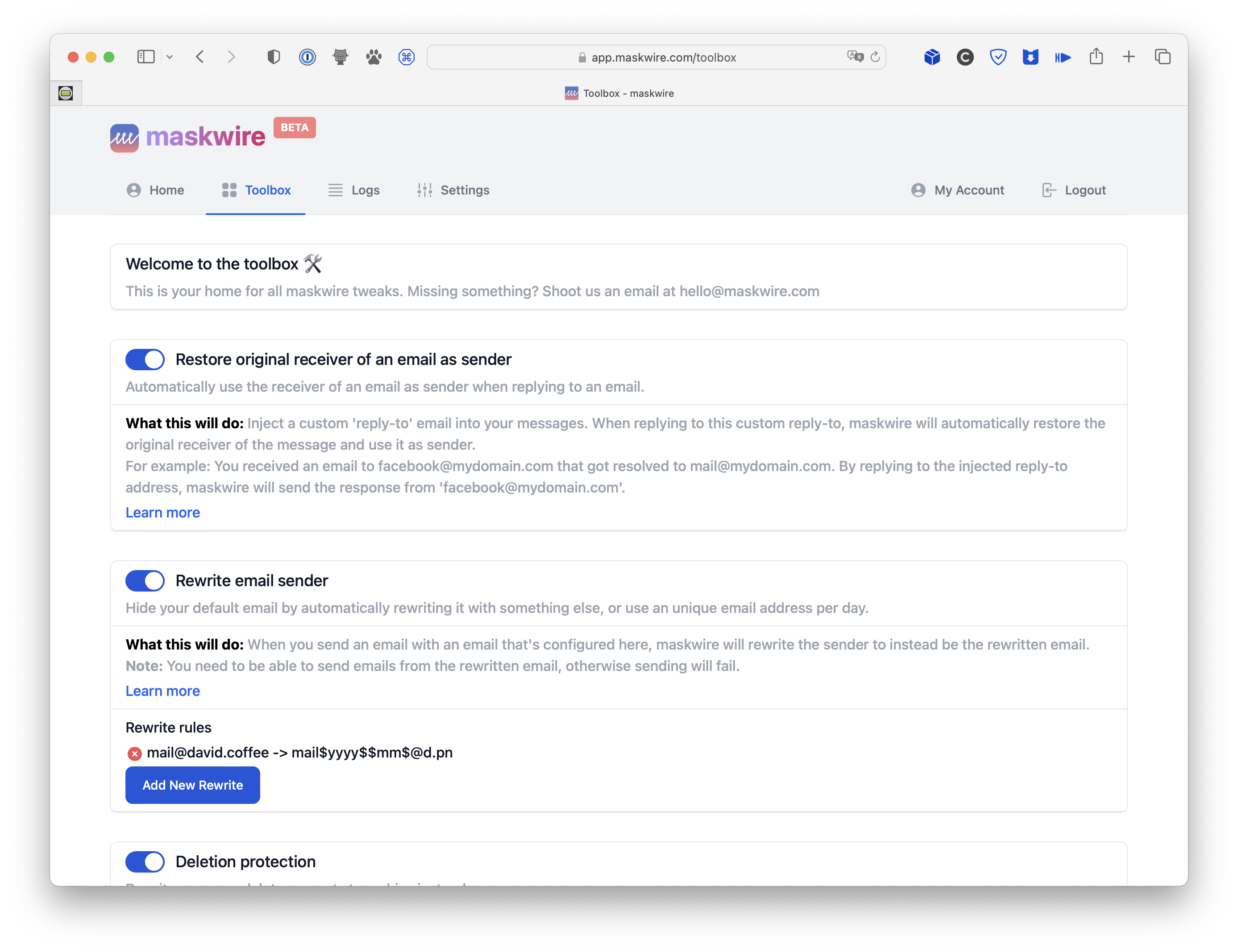
Maskwire aims to bring automations, tweaks, and security-related features into your email stack without the need to switch email providers or install dodgy add-ons.
At launch, Maskwire comes with a handful of tweaks (or "tools") that are ready to be used. Some of these tools are:
Example 1: Restoring the Receiver of an Email Back as Sender
Using domain-specific emails? I'm sure you've encountered the issue that when an email arrives at [email protected] and you want to reply to it, email clients simply can't do it unless you added aliases for [email protected] beforehand. Even worse, if you hit "Reply" in Mail.app on your iPhone, for example, the reply gets composed from your main email address, which you may not want to expose.
Maskwire fixes this by manipulating emails that your email client sees, so that emails are sent from the address that received them, just by hitting "Reply". Set and forget.
Example 2: Dynamically Rewrite the Sender with Patterns and Rules When Composing New Messages
Clicking on a mailto: link anywhere will open your email client with your default email set as the composer, which is sometimes not what you want. You may accidentally send the email from an address that you don't want to expose.
Maskwire can rewrite the sender of an email so that you never expose your main email address. Even better, Maskwire also handles dynamic naming patterns, for example, that new emails are always sent from "[email protected]", where the "2023-08-21" part is dynamically computed, effectively giving you throwaway email addresses when composing new messages.
Example 3: Never Accidentally Delete Messages
Ever had it that swiping an email in your client of choice can result in different behavior across OSes? Apple Mail may archive messages, but Samsung Mail on your Android issues a Delete command instead. Sometimes a quick action moves the message into Trash, sometimes it may go into Archive instead.
Maskwire can rewrite those commands that your email client issues and normalize them, so that messages are never moved into Trash but always go into Archive, independent of what your email client wants to do.
Security
Maskwire has been developed with security as the number 1 priority. It has been designed with the goal that Maskwire (and the Maskwire team) has no way to access a user's email account when the user is not present. This was very important because we don't want to store credentials but still need to be able to connect to the upstream email provider.
Email credentials are encrypted using a user-specific 2048-bit RSA key that is encrypted with the user's passphrase. Upon login through an email client, the RSA key will be decrypted using the passphrase, which then allows decryption of the actual email provider credentials.
This information is never stored on disk and is held in memory while the user's session is active. Once the user logs out, this data is purged from memory, meaning Maskwire will no longer be able to connect to an email provider.
In short, if the user doesn't have an active session through their email client, which passes the password to the Maskwire server, Maskwire has absolutely no way to access the user's credentials.
How Much Does Maskwire Cost? Is There a Free Tier?
Currently, while under development, Maskwire costs $3/month with a free tier that allows enabling of one tool or tweak of choice. So if you only care about replying from the email address that received a message, then you can do that completely free of charge.
The price and free tier will be tweaked over time to figure out what reflects the value offered by Maskwire the best.
Users who subscribe during the beta will be able to keep their $3/month price point, even if the final pricing ends up being higher than that.
Beta Now Available
Interested in giving Maskwire a try? Head over to https://app.maskwire.com to sign up!
Also, make sure you check out our Discord or follow us on Twitter to get informed about new releases.
Let us know what you think and what other tweaks you would like to see in Maskwire over at [email protected]!